GetTaxHub Before You Buy 2026: What Happens After You Click "Get Started"

The account is half-created. Your name is in, the password is set, and the cursor is blinking over a button that says "Get started." You're about to hand a stranger on a video call your W-2s, your 1099s and possibly your whole business. It's a perfectly reasonable moment to stop and ask: what exactly happens next, what will it cost, and what does the small print say if something goes wrong?
Olivia Reviews read GetTaxHub's homepage, services and pricing pages, FAQ, About page and full terms of service in October 2026 to answer those questions before you click. GetTaxHub, which brands itself as Taxhub, is a fully virtual tax preparation service: a CPA prepares and e-files your return after a phone or video call. This guide walks through the process step by step, the documents to have ready, the payment rules and the fine print.
Quick take: GetTaxHub's process is straightforward: get matched with a CPA, upload documents, have a call, approve and e-sign, then pay. Listed averages run from $325 for a personal return to $775 for a personal-plus-business bundle, and a free 5-minute call turns that average into a fixed quote. Read two things closely before you start: the payment-timing wording, which differs between pages, and a "maximum refund" policy that the terms limit to penalties and interest. See today's GetTaxHub deals before you register.
Please note: Olivia Reviews is not a tax adviser. This is general information about a service, not tax, legal or financial advice, and no provider can promise a particular refund or tax bill.
The journey, from sign-up to e-file
- Create an account and get matched. The About page says a CPA is assigned to you based on your needs, and that you'll work with the same CPA year after year.
- Send your documents. The FAQ lists three ways: upload files from your dashboard, email them through the company's mail server, or photograph paper forms and send them with the "text your files" option.
- Have your call. Schedule a phone or video call. The CPA asks questions about your situation and then completes the return.
- Wait about two days. The FAQ says your return will be ready for signature within 48 hours of the last piece of information arriving.
- Approve, sign and pay. You sign through what the About page describes as an Experian-powered identity check.
- E-file and refund. The FAQ says direct-deposit refunds can arrive in as little as 5 days, while a mailed check takes much longer, all depending on the IRS's current lead times.
When exactly do you pay?
This is one wording difference worth noticing. The homepage repeats "Pay only after you file," and the About page says payment isn't due until your return is accepted. The FAQ, however, describes paying once you've approved the return and says "once paid, we will file your taxes." In practice the bill comes at the end, after your approval, but ask your CPA to confirm the order before you sign.
What to gather before your first call
GetTaxHub doesn't publish a single checklist, but its pages mention specific documents for specific situations:
- Everyone: the forms behind your income, such as W-2s and 1099s, which are the forms its pricing tiers are built around.
- Traders and investors: year-end brokerage statements for every account. The FAQ says how trades are taxed depends on whether you're a casual trader or meet the IRS definition of a day trader.
- S-Corp owners: a complete income statement and, if required, a balance sheet. The FAQ calls this the biggest obstacle to filing an 1120-S, and says Taxhub can take your statements, supply a simple template or do the bookkeeping for you.
- Foreign owners of a US LLC: records of transactions between you and the company, such as capital contributions, reimbursements, payments for services, loans and transfers, which the Form 5472 page says are generally reportable.

Money questions, answered from the site
How is the price set?
À la carte, by the forms prepared. The pricing page shows averages ($325 personal, $380 self-employed, $550 business, $775 bundle), and the FAQ explains that your estimate may be adjusted once a CPA reviews your situation. You agree to the final fee before the return is prepared. The free 5-minute call on the homepage is meant to give you a fixed price up front.
Are there extra fees?
The FAQ says no monthly fees and no hidden state fees. The one add-on it names is a $15 bank fee if you qualify to have your preparation fee deducted from your refund. Paying by Visa, Mastercard or PayPal avoids it.
Is there a promo code?
Olivia Reviews didn't find a public promo code on gettaxhub.com in October 2026. The lowest-cost starting points are the free 5-minute call and the $49, 20-minute consultation. You can check the GetTaxHub coupon page for anything newer.
What about bookkeeping or S-Corp help?
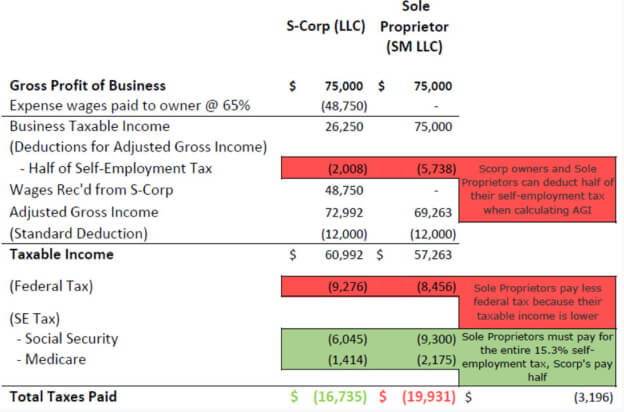
Bookkeeping plans are $99, $149 or $299 a month, and the bookkeeping page says you pay only after the first month. The S-Corp conversion service bundles formation, monthly bookkeeping, Gusto payroll and a year-end reasonable-wage review. Its calculator page lists example first-year running costs of $450 and says that below roughly $40,000 in net profit, you probably won't benefit from an S-Corp.
→ Check the latest GetTaxHub coupon codes and deals
The fine print in the terms of service
The terms page was last updated on 11/24/2020 and names GB Taxportunity, LLC as the operator. Five clauses deserve a careful read:
- The "maximum refund" policy is narrow. The FAQ advertises a 100% money-back promise that you'll get the maximum refund allowed by law. The terms define that policy far more tightly: it's limited to penalties and/or interest on a return prepared from the information you provided, "and to no other amount(s)."
- Claims go by mail, fast. You must notify the company by mail within 45 days of a penalty or interest being assessed, at an address in Edgewater, New Jersey, with supporting documents such as the IRS or state notice and proof of payment.
- Your own errors are yours. The company doesn't accept liability for user-generated errors, including data-entry mistakes.
- Audit defense covers its own returns. The terms say Taxhub defends the positions it takes on the federal and state returns it prepares, based on the information you supplied. Audit notices also have to be sent by mail.
- Liability and disputes. Total liability is capped at what you paid plus $10. Disputes go to binding arbitration in Bergen County, New Jersey, under New Jersey law, and the company can change its fees.

A few housekeeping details
- Some FAQ answers are old. The FAQ still has a section on Affordable Care Act penalties that refers to the 2014 and 2015 tax years. Treat it as out of date and ask your CPA about current rules.
- Copies of past returns: request them through the message chain in your account, or call the toll-free line, 1-844-TAX-PORT (1-844-829-7678).
- Prior years: the FAQ says you can file a previous year's return by creating an account and booking an appointment.
- Where it is: the footer lists 5 East 22nd Street in New York City, and a locations page names Chicago, Las Vegas, New York City, Salt Lake City and Tucson. The service itself is run online.
Your pre-flight checklist
| Stage | What to do |
|---|---|
| Before booking | Take the free 5-minute call and ask for your fixed quote in writing |
| Before the CPA call | Upload every income form, brokerage statement or business statement you have |
| Before signing | Review the return line by line; confirm the final fee and when payment is taken |
| At payment | Pay by card or PayPal if you want to skip the $15 refund-transfer fee |
| After filing | Save a copy of the return and any IRS or state letters; note the 45-day mail deadline for penalty claims |

Who should pause before signing up
If your return is a single W-2 with nothing else, a CPA-prepared return may be more service than you need. If you want to sit across a desk from your accountant, a fully virtual service isn't built for that. And if a narrow accuracy policy or New Jersey arbitration is a deal-breaker for you, that's worth knowing before the call rather than after.
GetTaxHub before-you-buy FAQ
How fast will my return be ready?
The FAQ says within 48 hours of receiving the last document needed, then refund timing depends on the IRS and how you choose to receive it.
Can I pay my CPA out of my refund?
If you qualify, yes, but the FAQ says a $15 bank fee applies.
Does the "maximum refund" promise cover the refund itself?
No. According to the terms, it's limited to penalties and/or interest and to no other amounts.
Will I keep the same accountant?
The brand says you'll work with the same CPA year after year.
Final verdict
GetTaxHub's process is simple to follow and its pricing is published openly on the site. The homework is on you: gather your documents first, lock in a fixed quote on the free call, confirm when payment is taken, and read the terms so you know the accuracy policy covers penalties and interest, not refunds. Then see today's GetTaxHub deals and book with your eyes open.
→ Check the latest GetTaxHub coupon codes and deals
Olivia Reviews researched GetTaxHub using its official website, product listings and published policies in October 2026. We haven't personally tested these products. This article is general information, not tax, legal or financial advice. We may earn a commission when you buy through our links, at no extra cost to you.